Automate Deactivation of Dormant AWS IAM Users
A blog on how to deactivate dormant IAM users by implementing Security at scale.

Overview
It often happens that the employees create AWS IAM users to perform some activity and forget to delete the user. Or these IAM users could be used only once in a long time. It could also happen that the employee who created the IAM user, is no longer a part of the organization. From a security point of view, it is not safe to keep such users active on the AWS account. These users should either be deleted (Especially if they are an ex-employee of the organization) or they should at least be deactivated.
This blog demonstrates how to automate the task at scale, that will find the dormant users and deactivate them from the AWS account.
Criteria for Dormant users
Ideally, if the IAM user has not accessed AWS services for more than 90 days, they can be considered as a dormant user.
What does deactivating an IAM user mean?
A user can either log in using Console Access or Programmatic access or both (i.e. User can log in using AWS console as well as using the Access keys).
While deactivating a user, we need to check the user’s last activity for both types of accesses. Based on the last activity, we can get the number of days the user has not used any AWS service. This needs to be done for both Console Login (Console Access) as well as login using access keys (Programmatic access).
AWS services used
In order to solve this problem, we will leverage a few AWS services, such as AWS Lambda, Cloudwatch and AWS Cloudformation Stack, and StackSets.
Before diving into the detailed solution, let’s understand what these AWS Services do.
AWS Lambda
We will use AWS Lambda to write our code to find dormant users and deactivate it.
AWS Cloudwatch Events
We will use AWS Cloudwatch Event to trigger our Lambda as a cron job.
AWS Cloudformation Stack and StackSets
We will use AWS Cloudformation StackSet to deploy our solution seamlessly to all the AWS accounts.
Solution
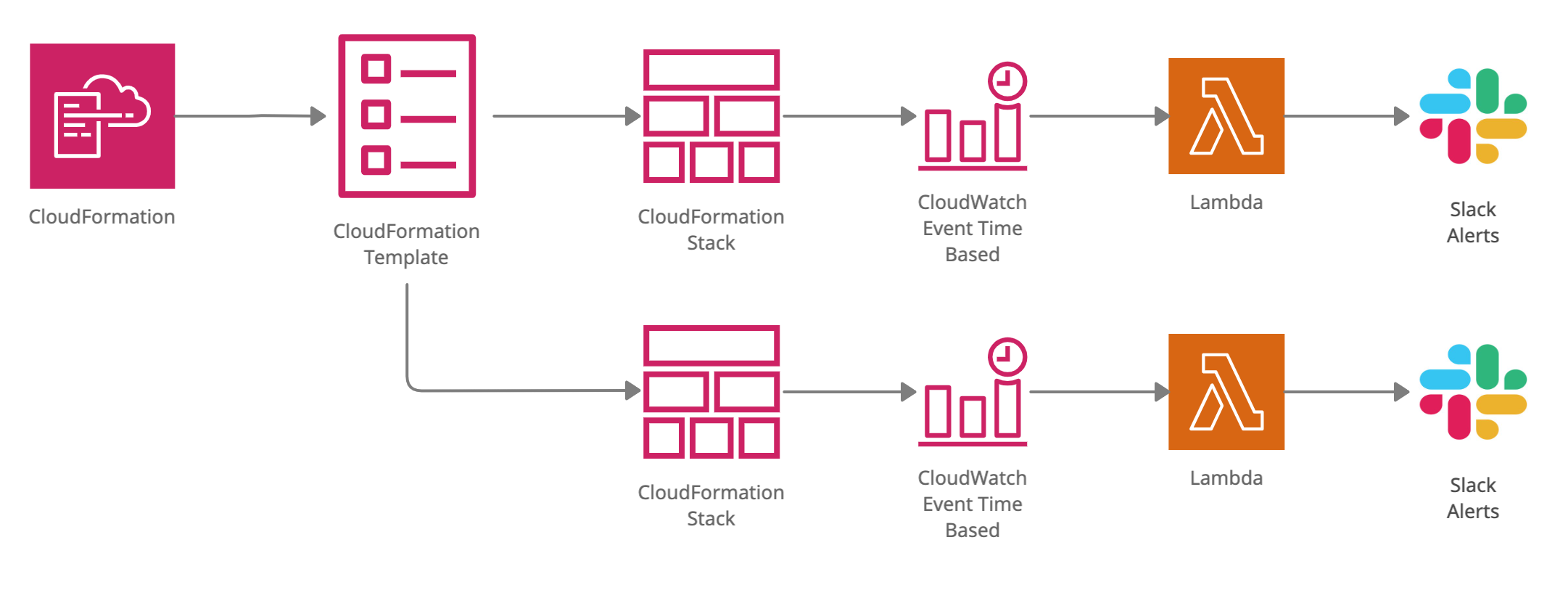
Our solution consists of:
A Lambda function that will find the dormant users, deactivate them and send an alert on slack about the same.
A Cloudwatch Event rule to trigger this Lambda function on a regular basis.
A Cloudformation StackSet to deploy this solution to all the AWS accounts in an organization.
Developing the AWS Lambda code
- We will dive right into the Lambda code and not see how to create a Lambda function, since we will be deploying it using the AWS Cloudformation template.
- Our code will be written in Python
- We will be using the boto3 python library to access AWS services.
import json
import boto3
from datetime import datetime
from datetime import timedelta
from botocore.exceptions import ClientError
import requests
import os

date_now = datetime.now()
iam_client = boto3.client('iam')
iam_resource = boto3.resource('iam')
max_idle_days = 90
max_items = 50

def lambda_handler(event, context):
    try:
        res_users = iam_client.list_users(
        MaxItems=max_items
        )
        for user in res_users['Users']:
            check_login_profile(user)
            check_access_keys(user)
    except ClientError as error:
        print('An error occurred while fetching user list.', error)

    if res_users['IsTruncated']:
        while res_users['IsTruncated']:
            marker = res_users['Marker']
            try:
                res_users = iam_client.list_users(Marker=marker,MaxItems=max_items)
                for user in res_users['Users']:
                    check_login_profile(user)
                    check_access_keys(user)
            except ClientError as error:
                print('An error occurred while fetching user list.', error)
- Let’s start with listing the IAM users in the account, using the
list_users()method. - You can get more information about this method here.
- Let’s first look at the method
check_login_profile()
def check_login_profile(userData):
    created_date = datetime.now()
    last_used_date = datetime.now()

    user_arn = userData['Arn']
    username = userData['UserName']
    user = iam_resource.User(username)
    login_profile = iam_resource.LoginProfile(username)
    user.load()

    passwd_last_used = user.password_last_used
    try:
        # Deactivate users with "None" PasswordLastUsed
        if passwd_last_used == None:
            ret_val = login_profile.delete()
            # Send slack alert
            response = requests.request("POST", url, data=get_slack_payload(username, False, arn=user_arn), headers=headers)
        # Deactivate users with PasswordLastUsed more than 90 days
        else:
            last_used_date = passwd_last_used.replace(tzinfo=None)
            difference = date_now - last_used_date
            if difference.days > max_idle_days:
                # Delete user password
                ret_val = login_profile.delete()
                # Send slack alert
                response = requests.request("POST", url, data=get_slack_payload(username, False, arn=user_arn, diff=difference.days), headers=headers)

    except Exception as e:
        print("Exception occurred:", e)
- This method takes user data as a parameter and compares the last accessed timestamp with the current date timestamp. If it is more than 90 days, the user is deactivated and a slack alert is sent to the user.
- The edge case here is if the user has console access enabled but the user never logged in. In this situation, the method
user.password_last_usedreturns None. - This is how we deactivate the console access.
- Next, let’s check out
check_access_keys()method.
def get_sensored_access_key(access_key):
    first_four = access_key[:4]
    last_four = access_key[-4:]
    return first_four + "*********" + last_four

def check_access_keys(userData):
    created_date = datetime.now()
    last_used_date = datetime.now()
    access_key_id = None

    username = userData['UserName']
    user_arn = userData['Arn']

     # Below we are checking for access keys last usage
    try:
        res_keys = iam_client.list_access_keys(UserName=username,MaxItems=2)

        if 'AccessKeyMetadata' in res_keys:
            for key in res_keys['AccessKeyMetadata']:
                if 'CreateDate' in key:
                    created_date = res_keys['AccessKeyMetadata'][0]['CreateDate'].replace(tzinfo=None)
                if 'AccessKeyId' in key:
                    access_key_id = key['AccessKeyId']
                    res_last_used_key = iam_client.get_access_key_last_used(AccessKeyId=access_key_id)
                    if 'LastUsedDate' in res_last_used_key['AccessKeyLastUsed']:
                        last_used_date = res_last_used_key['AccessKeyLastUsed']['LastUsedDate'].replace(tzinfo=None)
                    else:
                        last_used_date = created_date

                difference = date_now - last_used_date
                access_key_status = key['Status']         # Get status of the access keys
                if difference.days > max_idle_days and access_key_status == "Active":
                    access_key = iam_resource.AccessKey(username, access_key_id)   # Get user's access key details

                    # Deactivate Access key
                    ret_val = access_key.deactivate()
                    response = requests.request("POST", url, data=get_slack_payload(username, True, get_sensored_access_key(access_key_id), user_arn, diff=difference.days), headers=headers)

    except ClientError as error:
        print('An error occurred while listing access keys', error)
- In this method, we again take user data as a parameter and fetch the access keys assigned to the user.
- For every key, we extract
CreateDate,AccessKeyId, andLastUsedDateof the access key. - We will now take a look at the last part of the Lambda creation section, sending alerts to Slack.
- The pre-requisite for sending a Slack alert is to create a channel on the slack and integrate Webhook using these instructions. You will get a webhook URL which we will use in the future.
- Let’s take a look at how we can send Slack alerts
url = os.environ['WEBHOOK_URL']

headers = {
    'Content-Type': "application/json",
    'User-Agent': "PostmanRuntime/7.19.0",
    'Accept': "*/*",
    'Cache-Control': "no-cache",
    'Postman-Token': "59df68df-XXXX-XXXX-XXXX-9a2k5q56b8gf,458sadwa-XXXX-XXXX-XXXX-p456z4564a45",
    'Host': "hooks.slack.com",
    'Accept-Encoding': "gzip, deflate",
    'Content-Length': "497",
    'Connection': "keep-alive",
    'cache-control': "no-cache"
    }

def get_slack_payload(user, is_access_key, access_key="", arn="", diff=-1):
    payload = ""
    if diff == -1:
        diff = "Never"
    else:
        diff = str(diff) + " days"
    if is_access_key:
        payload = """{
                 \n\t\"channel\": \"#aws-iam-alerts\",
                 \n\t\"username\": \"IAM Bot\",
                 \n\t\"icon_emoji\": \":aws:\",
                 \n\t\"attachments\":[\n
                                       {\n
                                         \"fallback\":\"Access Key Deactivated\",\n
                                         \"pretext\":\"Access Key Deactivated\",\n
                                         \"color\":\"#34bb13\",\n
                                         \"fields\":[\n
                                                     {\n
                                                       \"title\":\"*User:* """ + user + """\",\n
                                                       \"value\":\"*ARN:* """ + arn + """\n*Access Key:* """ + access_key + """\n*Last Accessed:* """ + diff + """ \"\n
                                                     }\n
                                                   ]\n
                                         }\n
                                      ]\n
             }"""
    else:
        payload = """{
                 \n\t\"channel\": \"#aws-audit-alerts\",
                 \n\t\"username\": \"IAM Bot\",
                 \n\t\"icon_emoji\": \":aws:\",
                 \n\t\"attachments\":[\n
                                       {\n
                                         \"fallback\":\"User Deactivated\",\n
                                         \"pretext\":\"User Deactivated\",\n
                                         \"color\":\"#34bb13\",\n
                                         \"fields\":[\n
                                                     {\n
                                                       \"title\":\"*User:* """ + user + """\",\n
                                                       \"value\":\"*ARN:* """ + arn + """\n*Last Accessed:* """ + diff + """ \"\n
                                                     }\n
                                                   ]\n
                                         }\n
                                      ]\n
             }"""
    return payload
- The statement
os.environ['WEBHOOK_URL']suggests that we will take the webhook URL parameter as an environment variable. We will see later, how to pass this value to this Lambda function, later. - Store this code in the zip format in the S3 bucket. If you’re following the blog as is, then name the file
deactivate-iam.pyand the zip filedeactivate-iam.zip.
Configuring Cloudwatch
- We will use AWS Cloudwatch to define a rule that will trigger our Lambda function every day at a specific time.
- We won’t be demonstrating how to set up the Cloudwatch rule manually since we will be automating it using the Cloudformation template.
Automating the task using Cloudformation
- Imagine if your organization has multiple AWS accounts. Also, there’s a possibility that a new AWS account will be added in the future. How would you make sure that you implement this solution to all the AWS accounts?
- The answer to this question is Cloudformation StackSets!
- Using Cloudformation StackSets, we will create Cloudformation Stack in all the AWS accounts that will create the AWS resources like AWS Lambda, and Cloudwatch event rule.
- Using Cloudformation StackSets, we will create Cloudformation Stack in all the AWS accounts that will create the AWS resources like AWS Lambda, and Cloudwatch event rule.
- In order to deploy the stack, we will first develop the Cloudformation Template.
- Let’s start with the Parameters!
- We mentioned that we are going to take the Slack webhook URL as an environment variable. But how do you make that even more generic, so that it does not have to be hardcoded anywhere? We take the webhook URL as a template parameter.
- Now, let’s understand the resources, starting with the Lambda itself
- Here, we are defining the AWS Lambda function. Take a look at the value of
Handlerkey. The value should be<name_of_the_file>.lambda_handler(Since our entry point method's name is "lambda_handler"). - The
Environmentkey holds the environment variable that will be passed to the Lambda function. This environment variable will be passed through the Cloudformation template parameter. - I am storing my lambda function code in an AWS S3 bucket in a zip format, that could be fetched by the template.
Note: Make sure you either make the file publicly accessible, or at least accessible by all the AWS cross accounts. Since the lambda code does not have any sensitive information, I went ahead and made it publicly available.
- We need to define a role that will be assumed by the Lambda function to perform activities like ListUsers, GetLoginProfile, DeleteLoginProfile, etc.
- In this section, we will define the role and assign it to this Lambda function
- Here, we have defined the name of the role, the service that can assume this role, i.e.
lambda.amazonaws.comand then we define the policy for this role. - The permission iam:DeleteLoginProfile is used to deactivate the console access of the user and iam:UpdateAccessKey is used to make the access keys inactive. The rest of the permissions are readOnly permissions to list users, access keys, get the timestamp for when the access key was last used, etc.
- Next, we define the Cloudwatch Event rule.
- We name the event as
iamDeactivateDormantLambdaRule. It will trigger the Lambda function every day at 10 AM UTC. - The last resource we define is the permission for the Cloudwatch event to trigger the Lambda function.
- We attach this permission to the Cloudwatch event using the
SourceArnkey. - This is how the entire Cloudformation template looks like:
{
  "AWSTemplateFormatVersion": "2010-09-09",
  "Description": "Deploy Lambda Function to Deactivate IAM users and access keys that are inactive for more than 90 days.",
  "Parameters" : {
    "SlackWebhookParameter" : {
      "Type" : "String",
      "Default" : "",
      "Description" : "Webhook for Slack Channel"
    }
  },
  "Resources": {
    "iamDeactivateDormantLambda": {
      "Type": "AWS::Lambda::Function",
      "Properties": {
        "FunctionName": "iamDeactivateDormant",
        "Handler": "deactivate-iam.lambda_handler",
        "Environment" : {
            "Variables": { "WEBHOOK_URL": {"Ref": "SlackWebhookParameter"} }
        },
        "Role": {
          "Fn::GetAtt": [
            "iamDeactivateDormantLambdaRole",
            "Arn"
          ]
        },
        "Code": {
          "S3Bucket": "<S3_Bucket_Name>",
          "S3Key": "deactivate-iam.zip"
        },
        "Runtime": "python3.7",
        "Timeout": 300
      }
    },
    "iamDeactivateDormantLambdaRole": {
        "Type": "AWS::IAM::Role",
        "Properties": {
          "RoleName": "iamDeactivateDormantLambdaRole",
          "AssumeRolePolicyDocument": {
            "Version": "2012-10-17",
            "Statement": [{
              "Effect": "Allow",
              "Principal": {
                "Service": [ "lambda.amazonaws.com" ]
              },
              "Action": [ "sts:AssumeRole" ]
            }]
          },
          "Path": "/",
          "Policies": [{
            "PolicyName": "iamDeactivateDormantLambdaPolicy",
            "PolicyDocument": {
              "Version": "2012-10-17",
              "Statement": [{
                "Effect": "Allow",
                "Action": [
                    "iam:ListUsers",
                    "iam:ListAccessKeys",
                    "iam:GetAccessKeyLastUsed",
                    "iam:DeleteLoginProfile",
                    "iam:GetAccessKeyLastUsed",
                    "iam:ListAccessKeys",
                    "iam:ListUsers",
                    "iam:GetUser",
                    "iam:GetLoginProfile",
                    "iam:UpdateAccessKey"
                ],
                "Resource": "*"
              }]
            }
          }]
        }
      },
      "ScheduledRule": {
        "Type": "AWS::Events::Rule",
        "Properties": {
          "Description": "Rule to trigger iamDeactivateDormant Lambda",
          "Name" : "iamDeactivateDormantLambdaRule",
          "ScheduleExpression": "cron(0 10 * * ? *)",
          "State": "ENABLED",
          "Targets": [{
            "Arn": { "Fn::GetAtt": ["iamDeactivateDormantLambda", "Arn"] },
            "Id": "TargetFunctionV1"
          }]
        }
      },
      "PermissionForEventsToInvokeLambda": {
        "Type": "AWS::Lambda::Permission",
        "Properties": {
          "FunctionName": { "Ref": "iamDeactivateDormantLambda" },
          "Action": "lambda:InvokeFunction",
          "Principal": "events.amazonaws.com",
          "SourceArn": { "Fn::GetAtt": ["ScheduledRule", "Arn"] }
        }
      }
  }
}
- Let’s go ahead and deploy our template using Cloudformation StackSet.
Note: Follow these steps if you have set up AWS Organizations. Using these steps, we will deploy the stack to all the child accounts. To deploy this stack on the parent account, we use the Cloudformation stack since StackSet does not create the stack in the parent account.
- Check the region where you are creating the StackSet. Click on
Create StackSet. - Enter the SlackWebhookParameter Parameter. This will be passed to the Lambda function as an environment variable.
- Under Configure StackSet options step, you can keep the configuration as-is. Adding tags is optional.
- Under the Set deployment options step, Select
Deploy new stacks. - Under Deployment targets, select Deploy to organizational units (OUs). For AWS OU ID, we need to find the OU ID of the parent/Root account.
- Click Next to review the StackSet and Submit. Your StackSets will start creating stacks in all your accounts.
- The last step that is remaining is to deploy the Stack on the Parent/Root account since the StackSet does not deploy the Stack on the Root account (The account from which you are deploying the StackSet)
Note: Make sure you are deploying the stack in the correct region.
- In order to do that, Click on Stacks under Cloudformation. Click on
CreateStackon the top right. Under the dropdown, select With new resources - We create Stack similar to how we created StackSets, using the same template and same parameter value.
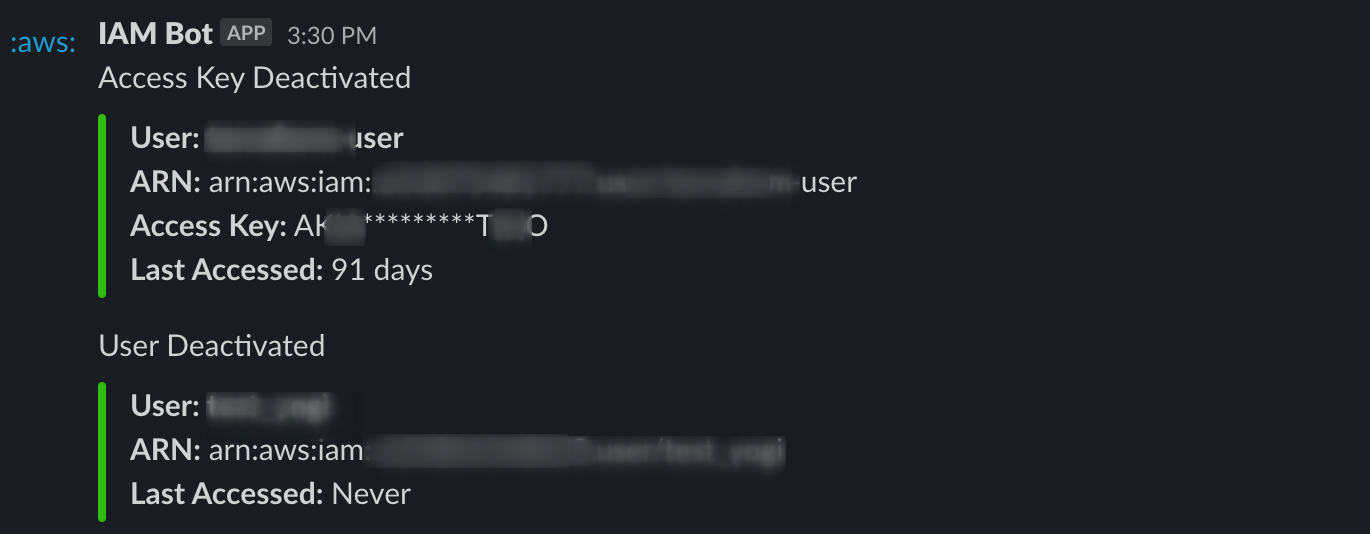
Check Slack Alerts
If you have any IAM users that have been inactive for more than 90 days, you will get an alert on Slack.
Conclusion
We have successfully deployed our solution to all the cloud accounts using Cloudformation Stacks and StackSets. To verify that we have deployed it correctly, you can visit any account and check for the Lambda that is created, the Cloudwatch event rule, and the IAM Role created for the Lambda.
We used Cloudformation StackSets to implement AWS security measures that are scalable. In the future, if there is any new account added to the Organization, the same stack will be created for that account automatically.
About the author
Hrushikesh specializes in Application Security, Cloud and Cloud-Native security.
Comments
Join the discussionNo comments yet. Be the first to comment.